Format Menu (फॉर्मेट मेनू) :-
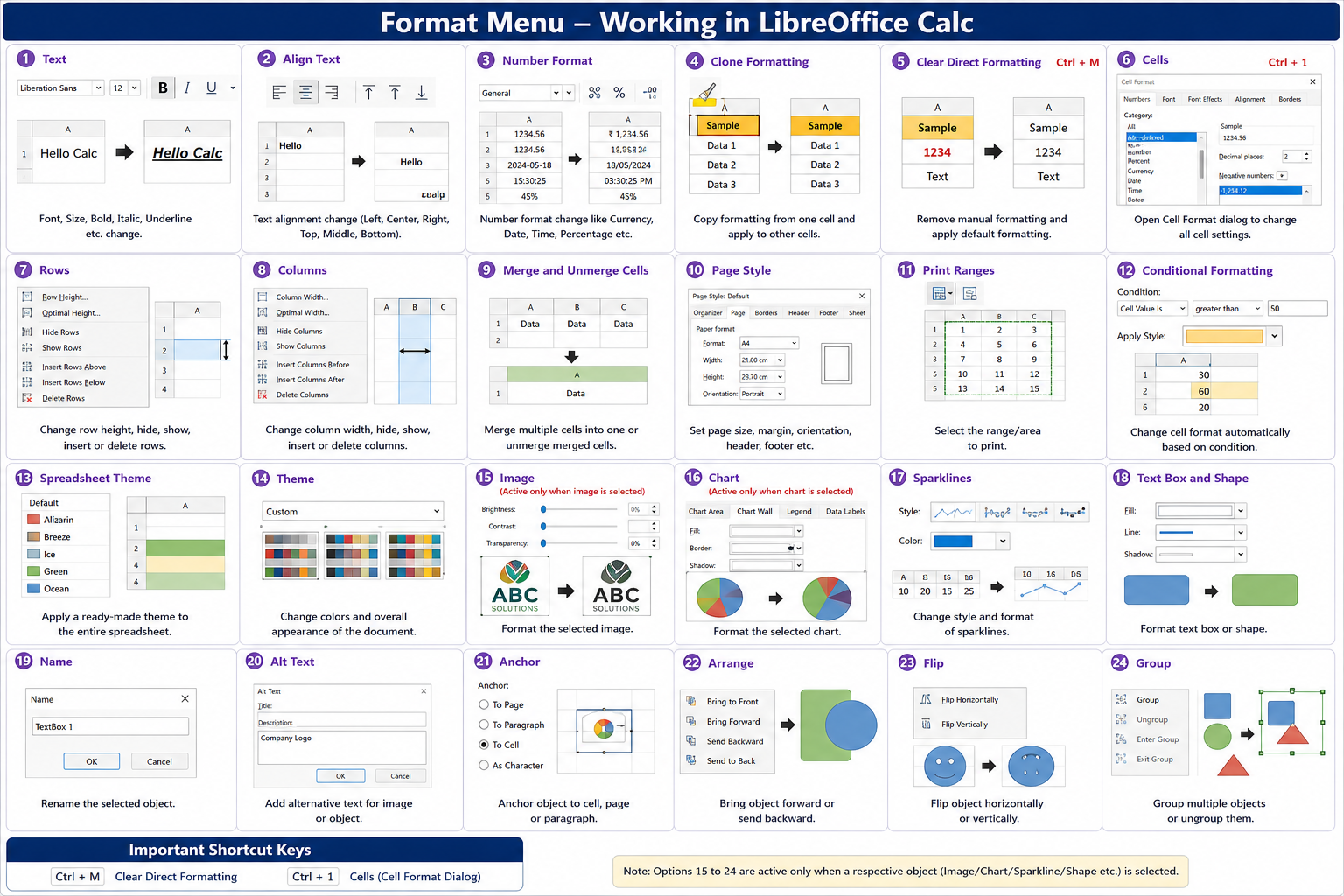
Hindi: Format Menu का उपयोग Worksheet के Data, Cell, Row, Column, Text तथा Page की Formatting बदलने के लिए किया जाता है।
English: The Format Menu is used to format cells, text, rows, columns, and pages in a worksheet.
1. Text (टेक्स्ट)
Hindi: Cell के Text का Font, Size, Bold, Italic, Underline आदि बदलने के लिए।
English: Used to change Font, Size, Bold, Italic, Underline, and other text formatting.
Shortcut Key: No Default Shortcut
2. Align Text (अलाइन टेक्स्ट) :-
Hindi: Text की Position (Left, Center, Right, Top, Middle, Bottom) बदलने के लिए।
English: Used to align text horizontally and vertically.
Shortcut Key: No Default Shortcut
3. Number Format (नंबर फॉर्मेट) :-
Hindi: Number को Currency, Date, Time, Percentage आदि Format में बदलने के लिए।
English: Used to format numbers as Currency, Date, Time, Percentage, etc.
Shortcut Key: No Default Shortcut
4. Clone Formatting (क्लोन फॉर्मेटिंग) :-
Hindi: एक Cell की Formatting दूसरे Cell पर लागू करने के लिए।
English: Copies formatting from one cell and applies it to another.
Shortcut Key: No Default Shortcut
5. Clear Direct Formatting :-
Hindi: Manual Formatting हटाकर Default Formatting लागू करता है।
English: Removes direct formatting and restores the default style.
Shortcut Key: Ctrl + M
6. Cells :-
Hindi: Cell की सभी Formatting Settings बदलने के लिए।
English: Opens the Cell Format dialog to change all cell settings.
Shortcut Key: Ctrl + 1
7. Rows (रो) :-
Hindi: Row की Height, Hide, Show तथा अन्य Row Formatting के लिए।
English: Used to manage Row Height, Hide, Show, and Row formatting.
Shortcut Key: No Default Shortcut
8. Columns (कॉलम) :-
Hindi: Column की Width, Hide, Show तथा अन्य Column Formatting के लिए।
English: Used to manage Column Width, Hide, Show, and Column formatting.
Shortcut Key: No Default Shortcut
9. Merge and Unmerge Cells :-
Hindi: कई Cells को जोड़ना या अलग करना।
English: Combines multiple cells into one or separates merged cells.
Shortcut Key: No Default Shortcut
10. Page Style :-
Hindi: Page Size, Margin, Orientation, Header, Footer आदि सेट करने के लिए।
English: Used to set page size, margins, orientation, header, and footer.
Shortcut Key: No Default Shortcut
11. Print Ranges :-
Hindi: Print होने वाले Area को निर्धारित करने के लिए।
English: Defines the area of the worksheet to print.
Shortcut Key: No Default Shortcut
12. Conditional Formatting :-
Hindi: शर्त के अनुसार Cell का Format बदलने के लिए।
English: Changes cell formatting automatically based on conditions.
Shortcut Key: No Default Shortcut
13. Spreadsheet Theme :-
Hindi: पूरी Spreadsheet पर Theme लागू करने के लिए।
English: Applies a predefined theme to the spreadsheet.
Shortcut Key: No Default Shortcut
14. Theme :-
Hindi: रंग और डिजाइन बदलने के लिए।
English: Changes the color and appearance of the document.
Shortcut Key: No Default Shortcut
15. Image :-
Hindi: Insert की गई Image की Formatting बदलने के लिए।
English: Used to format the selected image.
Shortcut Key: No Default Shortcut
Note: यह विकल्प केवल Image Select होने पर Active होता है।
16. Chart :-
Hindi: Chart की Formatting बदलने के लिए।
English: Used to format the selected chart.
Shortcut Key: No Default Shortcut
Note: यह विकल्प केवल Chart Select होने पर Active होता है।
17. Sparklines :-
Hindi: Sparkline का Style और Format बदलने के लिए।
English: Used to format Sparklines.
Shortcut Key: No Default Shortcut
18. Text Box and Shape :-
Hindi: Shape तथा Text Box की Formatting बदलने के लिए।
English: Used to format Text Boxes and Shapes.
Shortcut Key: No Default Shortcut
19. Name :-
Hindi: Object का Name बदलने के लिए।
English: Used to rename the selected object.
Shortcut Key: No Default Shortcut
20. Alt Text :-
Hindi: Image या Object के लिए वैकल्पिक विवरण (Alternative Description) जोड़ने हेतु।
English: Adds alternative text for accessibility.
Shortcut Key: No Default Shortcut
21. Anchor :-
Hindi: Object को Cell, Page या Paragraph से जोड़ने के लिए।
English: Anchors an object to a cell, page, or paragraph.
Shortcut Key: No Default Shortcut
22. Arrange :-
Hindi: Object को आगे (Bring to Front) या पीछे (Send to Back) लाने के लिए।
English: Changes the order of objects (Bring to Front/Send to Back).
Shortcut Key: No Default Shortcut
23. Flip :-
Hindi: Object को Horizontal या Vertical दिशा में पलटने के लिए।
English: Flips the selected object horizontally or vertically.
Shortcut Key: No Default Shortcut
24. Group :-
Hindi: कई Objects को एक साथ Group या Ungroup करने के लिए।
English: Groups or ungroups multiple selected objects.
Shortcut Key: No Default Shortcut