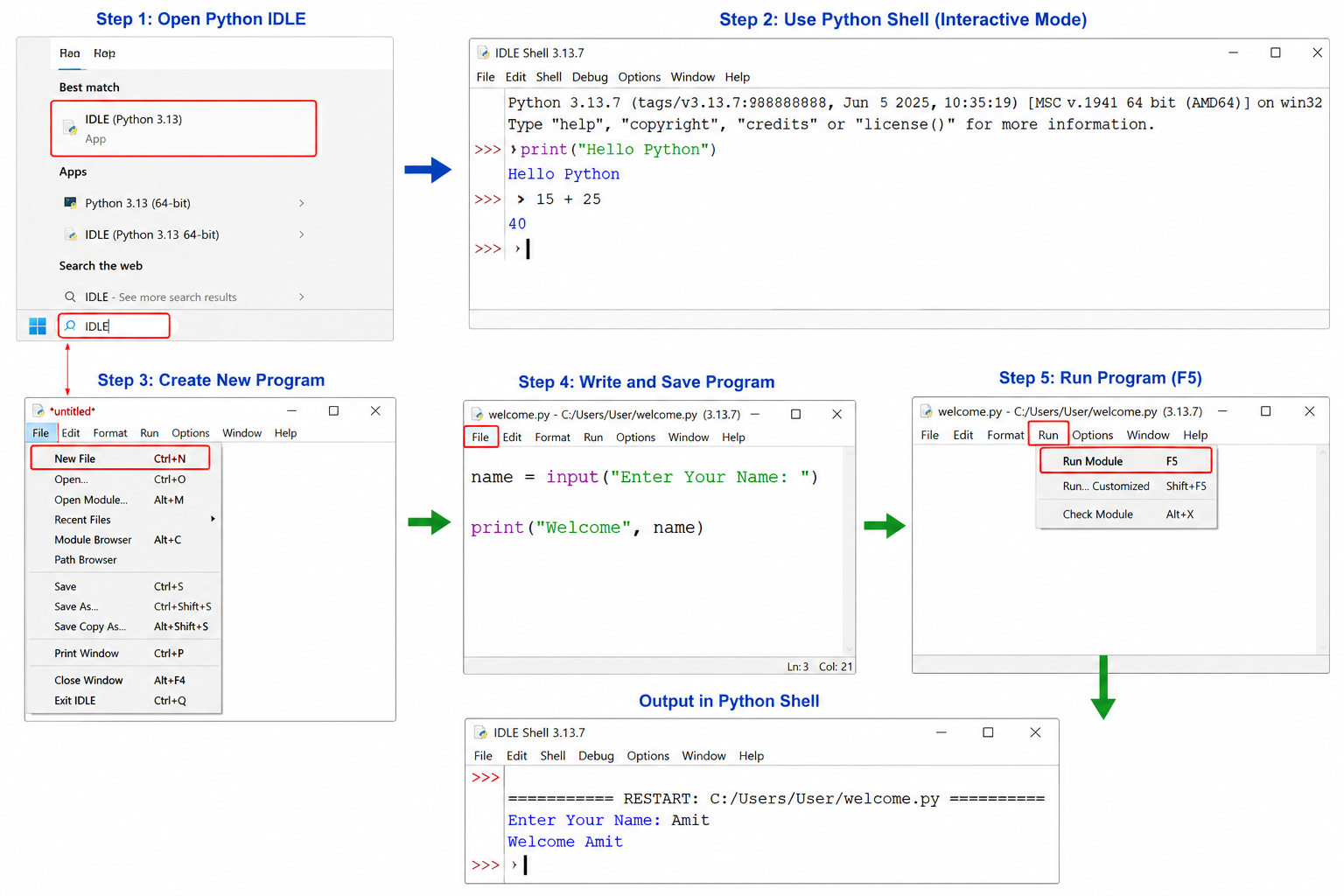
Python IDLE (Integrated Development and Learning Environment) :-
Python IDLE (Integrated Development and Learning Environment) Python का Default IDE (Integrated Development Environment) है। यह Python के साथ स्वतः (Automatically) Install हो जाता है और इसका उपयोग Python Program लिखने (Write), चलाने (Execute), परीक्षण (Test) तथा Debug (त्रुटि खोजने) के लिए किया जाता है।
IDLE विशेष रूप से Beginners (शुरुआती उपयोगकर्ताओं) और Students (विद्यार्थियों) के लिए बनाया गया है क्योंकि इसका Interface बहुत सरल और उपयोगकर्ता-अनुकूल (User-Friendly) होता है।
English
Python IDLE (Integrated Development and Learning Environment) is the default Integrated Development Environment (IDE) for Python. It is installed automatically with Python and is used to write, execute, test, and debug Python programs.
It is specially designed for beginners and students because of its simple and user-friendly interface.
Python IDLE का उपयोग कैसे करें? (How to Use Python IDLE?) - Step 1: Python IDLE खोलें
- Start Menu खोलें।
- IDLE Search करें।
- IDLE (Python 3.x) पर Click करें।
- Python Shell खुल जाएगी।
Step 2: Python Shell का उपयोग करें
Python Shell में सीधे Commands लिखकर तुरंत Output प्राप्त करें।
Example:
>>> print("Hello Python") Hello Python >>> 15 + 25 40
यह Interactive Mode कहलाता है।
Step 3: नया Program बनाएँ
- File → New File या Ctrl + N दबाएँ।
- Editor Window में Program लिखें।
Step 4: Program Save करें
- File → Save या Ctrl + S दबाएँ।
- File को .py Extension के साथ Save करें।
Example: welcome.py
Step 5: Program Run करें
- Run → Run Module पर Click करें या F5 दबाएँ।
- यदि पहली बार Run कर रहे हैं, तो पहले File Save करें।
- Program का Output Python Shell में दिखाई देगा।