Introduction to Publishing Tools (Publishing Tools का परिचय)
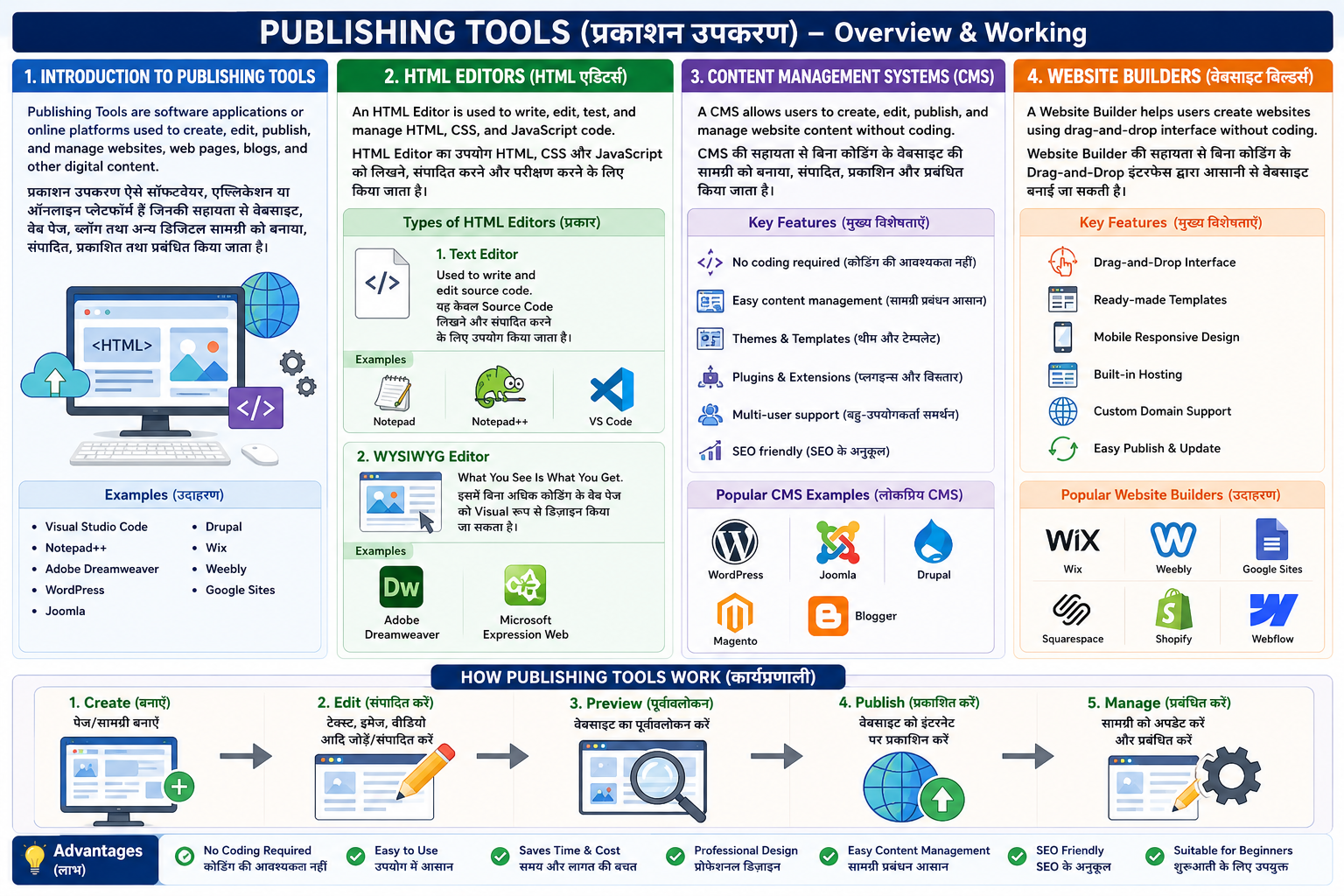
Publishing Tools (प्रकाशन उपकरण) ऐसे Software, Applications या Online Platforms हैं जिनकी सहायता से वेबसाइट (Website), वेब पेज (Web Pages), ब्लॉग (Blogs) तथा अन्य डिजिटल सामग्री (Digital Content) को बनाया (Create), संपादित (Edit), प्रकाशित (Publish) तथा प्रबंधित (Manage) किया जाता है।
इन Tools की सहायता से बिना अधिक Programming Knowledge के भी वेबसाइट तैयार की जा सकती है। ये Web Development को आसान, तेज़ और अधिक प्रभावी बनाते हैं।
Publishing Tools are software applications or online platforms used to create, edit, publish, and manage websites, web pages, blogs, and other digital content.
These tools make web development easier and allow users to create websites without extensive programming knowledge.
उदाहरण (Examples)
- Visual Studio Code
- Notepad++
- Adobe Dreamweaver
- WordPress
- Joomla
- Drupal
- Wix
- Weebly
- Google Sites
HTML Editors (HTML एडिटर्स):-
HTML Editor एक ऐसा Software या Application है जिसका उपयोग HTML (HyperText Markup Language), CSS और JavaScript को लिखने (Write), संपादित (Edit), परीक्षण (Test) और प्रबंधित (Manage) करने के लिए किया जाता है।
HTML Editor वेब डेवलपर्स को वेबसाइट बनाने और संपादित करने में सहायता करता है। इसमें Syntax Highlighting, Auto-completion और Error Detection जैसी सुविधाएँ उपलब्ध होती हैं, जिससे Coding आसान और तेज़ हो जाती है।
An HTML Editor is a software application used to write, edit, test, and manage HTML (HyperText Markup Language), CSS, and JavaScript code for creating web pages.
It helps web developers create websites more efficiently by providing features such as Syntax Highlighting, Auto-completion, Error Detection, and Code Formatting.
HTML Editors के प्रकार (Types of HTML Editors) 1. Text Editor
यह केवल Source Code लिखने और संपादित करने के लिए उपयोग किया जाता है।
A Text Editor is used to write and edit source code.
उदाहरण (Examples):
- Notepad
- Notepad++
- Visual Studio Code (VS Code)
2. WYSIWYG Editor
WYSIWYG का पूरा नाम What You See Is What You Get है।
इस प्रकार के Editor में उपयोगकर्ता बिना अधिक Coding के Web Page को Visual रूप से Design कर सकता है। जैसा डिज़ाइन स्क्रीन पर दिखाई देता है, वैसा ही अंतिम Web Page बनता है।
WYSIWYG stands for What You See Is What You Get.
It allows users to design web pages visually without writing much code. The displayed design closely matches the final web page.
उदाहरण (Examples):
- Adobe Dreamweaver
- Microsoft Expression Web
Content Management Systems (CMS):-
CMS (Content Management System) एक Software या Web Application है, जिसकी सहायता से Website की सामग्री (Content) को बनाया (Create), संपादित (Edit), प्रकाशित (Publish) और प्रबंधित (Manage) किया जाता है, बिना अधिक Programming या Coding Knowledge के।
CMS उपयोगकर्ताओं को Text, Images, Videos और अन्य डिजिटल सामग्री को आसानी से जोड़ने, संशोधित करने और हटाने की सुविधा प्रदान करता है। यह वेबसाइट को बनाए रखना (Maintain) और अपडेट करना सरल बनाता है।
A Content Management System (CMS) is a software application or web application that allows users to create, edit, publish, and manage website content without requiring extensive programming or coding knowledge.
A CMS enables users to manage text, images, videos, and other digital content easily, making website development and maintenance faster and more efficient.
Popular CMS Examples
- WordPress
- Joomla
- Drupal
- Magento
- Blogger
Website Builders (वेबसाइट बिल्डर्स):-
Website Builder एक Online Tool या Software Platform है, जिसकी सहायता से बिना Programming या Coding Knowledge के आसानी से वेबसाइट बनाई जा सकती है।
अधिकांश Website Builders Drag-and-Drop Interface प्रदान करते हैं, जिससे उपयोगकर्ता Text, Images, Videos और अन्य Elements को आसानी से जोड़कर Professional Website बना सकता है। इनमें पहले से बने हुए Templates (पूर्व-निर्मित डिज़ाइन) उपलब्ध होते हैं, जिससे वेबसाइट जल्दी तैयार की जा सकती है।
A Website Builder is an online tool or software platform that allows users to create websites without programming or coding knowledge.
Most website builders provide a drag-and-drop interface, allowing users to add text, images, videos, and other elements easily. They also offer ready-made templates, making website creation faster and simpler.
Popular Website Builders (Examples)
- Wix
- Weebly
- Google Sites
- Squarespace
- Shopify
- Webflow